<?xml version="1.0" encoding="utf-8" ?><feed xmlns="http://www.w3.org/2005/Atom" xml:lang="en-US"><link rel="self" href="https://opendevise.com/blog/feed.xml" type="application/atom+xml" /><link rel="alternate" href="https://opendevise.com/blog" type="text/html" /><updated>2019-09-19T22:00:00Z</updated><id>https://opendevise.com/blog</id><title>Docs Dispatch</title><subtitle>Ideas, insights, and experiences from OpenDevise about documentation as well as news about our company and products.</subtitle><author><name>OpenDevise Inc.</name></author><entry><title>OpenDevise is striking for the Climate on Sept. 20th</title><link rel="alternate" href="https://opendevise.com/blog/global-climate-strike/" type="text/html" /><published>2019-09-19T22:00:00Z</published><updated>2019-09-19T22:00:00Z</updated><id>https://opendevise.com/blog/global-climate-strike/</id><author><name>Dan Allen</name></author><category term="News" /><content type="html"><![CDATA[<div id="preamble">
<div class="sectionbody">
<div class="paragraph">
<p>We&#8217;re at a pivotal time for our species and our planet. The world is facing an existential crisis and we must act. And so, this September 20th, we will be joining the young climate strikers and millions of others in a Global <a href="https://twitter.com/search?q=%23ClimateStrike">#ClimateStrike</a> on the streets and demand an end to the use of fossil fuels. We demand climate justice for everyone.</p>
</div>
</div>
</div>
<div class="sect1">
<h2 id="_tldr">TLDR;<a class="anchor" href="#_tldr"></a></h2>
<div class="sectionbody">
<div class="ulist">
<ul>
<li>
<p>Our site will &#8220;go green&#8221; with a digital strike on Sept. 20, 2019.</p>
</li>
<li>
<p>There will be a banner at the bottom of our site leading up to the event.</p>
</li>
<li>
<p>There will be a full banner across the entire website on Sept. 20th.</p>
</li>
<li>
<p>Our team will be on strike that day and participating in a Global Climate Strike march.</p>
</li>
</ul>
</div>
</div>
</div>
<div class="sect1">
<h2 id="_why">Why?<a class="anchor" href="#_why"></a></h2>
<div class="sectionbody">
<div class="paragraph">
<p>Our planet&#8212;&#8203;our house&#8212;&#8203;is on fire.
We&#8217;re in the midst of the 6th mass extinction.
In the <a href="https://www.ipcc.ch/sr15/">IPCC report</a>, scientists tell us that we have 420 gigatons of CO2 budget left to have a 67% chance to keep global warming under control (below 1.5C degree of warming).
<a href="https://www.nytimes.com/interactive/2018/10/07/climate/ipcc-report-half-degree.html">Beyond that</a>, we face a tipping point that will put unbearable pressure on human civilization.
To make the matter worse, by many accounts, the IPCC is considered to be very optimistic.
Our CO2 budget to achieve the goals set out in <a href="https://unfccc.int/process-and-meetings/the-paris-agreement/what-is-the-paris-agreement">the Paris Agreement</a> may already be depleted.
The melting of the Greenland ice sheets we saw this summer was only supposed to happen by 2070.
And storms like Hurrican Dorian, which turned the lives of countless people upside down, are being intensified by climate change.
A hotter ocean means stronger storms, a rising sea means worse flooding, a hotter atmosphere means more rain.
These storms are only expected to get worse and more frequent if we continue to let the climate break down.</p>
</div>
<div class="paragraph">
<p>Today, we&#8217;re on track to blow that CO2 budget.
We&#8217;re releasing about 42 gigatons of CO2 per year.
And despite all the efforts of the past 30 years from many activists and governments, emissions are still rising.
The emissions need to <em>stop</em>.
We need to unite behind the science, recognize the existential threat that climate change is, and act.</p>
</div>
<div class="paragraph">
<p>This digital climate strike is an effort to raise awareness of what is happening and communicate that we can&#8217;t wait any longer.
We have to act quickly and decisively because we&#8217;re running out of time.
We need massive mobilization for the climate.
We are calling on leaders to take the measures required to safeguard the conditions for a dignified life for everybody on earth.</p>
</div>
<div class="imageblock grow-x">
<div class="content">
<img src="https://opendevise.com/img/blog/climate-strike-feature.jpg" alt="Greta Thunberg">
</div>
</div>
<div class="paragraph">
<p>Communication platforms have a huge role to play in this fight.
We were tremendously inspired by <a href="https://twitter.com/gretathunberg">Greta Thunberg</a>, a Swedish climate activist, when she sat in front of the Swedish parliment a year ago to stike for the climate (and each Friday since) and when she gave her poignant speech to UN Secretary-General António Guterres at COP24.
We heard her message because of tech.
And we were able to follow her ongoing strikes and her carbon-free transatlantic journey thanks to tech.
Tech has the power to communicate in a way no other platform ever has.
It has the power to end the climate crisis.
So we&#8217;re answering Greta&#8217;s call to action, and the call of the scientists and other activists, to do something.
To act.</p>
</div>
<div class="paragraph">
<p>We will be joining the <a href="https://actionnetwork.org/events/colorado-climate-strike-denver">Global Climate Strike in Denver, CO</a> on Sept. 20th.
And we&#8217;ll continue to fight for our future, this Friday and every day after.</p>
</div>
</div>
</div>
<div class="sect1">
<h2 id="_what-can-you-do-to-help">What can you do to help?<a class="anchor" href="#_what-can-you-do-to-help"></a></h2>
<div class="sectionbody">
<div class="ulist">
<ul>
<li>
<p><strong>Listen to the science.</strong></p>
</li>
<li>
<p>Ask your company to join the <a href="https://digital.globalclimatestrike.net/">digital strike for climate</a>.</p>
</li>
<li>
<p>Take time to contribute to one of the movements for the climate, such as <a href="https://www.sunrisemovement.org/">Sunrise Movement</a>, <a href="https://rebellion.global/">Extinction Rebellion</a>, <a href="https://www.fridaysforfuture.org/">Fridays for Future</a>, <a href="https://350.org/">350.org</a>, <a href="https://citizensclimatelobby.org/">Citizens&#8217; Climate Lobby</a>, or one of the many other organizations fighting for our future.
Your voice as member of the tech community can make a real difference.</p>
</li>
<li>
<p>If you can afford to, take time off or a sabbatical to join one of those movements full force.</p>
</li>
<li>
<p>Get your company to allow you to participate in one of these movements during your working hours.
An example of a company doing this is Atlassian.
They were amoung the first tech giants to <a href="https://www.smh.com.au/politics/federal/can-t-rely-on-governments-alone-atlassian-leads-push-for-staff-to-attend-global-climate-strike-20190902-p52n44.html">push employees to join the strikes</a>, which then prompted many other major tech companies to do the same.</p>
</li>
<li>
<p>Donate to one of the aforementioned movements on OpenCollective: <a href="https://opencollective.com/search?q=climate" class="bare">https://opencollective.com/search?q=climate</a>.
OpenCollective is participating heavily in the Climate Strike.</p>
</li>
</ul>
</div>
<div class="paragraph">
<p>See you on the streets.</p>
</div>
<div class="paragraph">
<p>Dan Allen and Sarah White, cofounders of OpenDevise</p>
</div>
</div>
</div>
<div class="sect1">
<h2 id="_attribution">Attribution<a class="anchor" href="#_attribution"></a></h2>
<div class="sectionbody">
<div class="paragraph">
<p>This post was adapted from a post made by <a href="https://blog.opencollective.com/digital-climate-strike/">Pia &amp; Xaviar at OpenCollective</a>, who are demonstrating tremendous leadership in the cause for climate action.</p>
</div>
</div>
</div>]]></content><summary type="html">The world is facing a climate and ecological crisis, an existential threat to life as we know it. To encourage action, OpenDevise and opendevise.com will be joining the Global Climate Strike on Sept 20th.</summary><media:thumbnail xmlns:media="http://search.yahoo.com/mrss/" url="https://opendevise.com/img/blog/climate-strike-feature.jpg" /></entry><entry><title>Antora 2.0 has Shipped!</title><link rel="alternate" href="https://opendevise.com/blog/antora-2-0-has-shipped/" type="text/html" /><published>2018-12-30T18:00:00Z</published><updated>2018-12-30T18:00:00Z</updated><id>https://opendevise.com/blog/antora-2-0-has-shipped/</id><author><name>Sarah White</name></author><category term="Antora" /><category term="News" /><content type="html"><![CDATA[<div id="preamble">
<div class="sectionbody">
<div class="paragraph">
<p>We&#8217;re so excited to announce the release of Antora 2.0. This release streamlines the installation process, improves platform and library compatibility, provides a simpler and pluggable authentication mechanism for private repositories, and delivers the latest Asciidoctor capabilities.
You can read all about these changes on the (freshly minted) <a href="https://docs.antora.org/antora/2.0/whats-new/">What&#8217;s New page</a> in the Antora documentation.</p>
</div>
</div>
</div>
<div class="sect1">
<h2 id="_thank-you">Thank You!<a class="anchor" href="#_thank-you"></a></h2>
<div class="sectionbody">
<div class="paragraph">
<p>We want to say <em>Thank You!</em> to all of the folks who&#8217;ve helped us make Antora what it is today.</p>
</div>
<div class="paragraph">
<p><strong>Thank you, Guillaume!</strong>
<a href="https://github.com/mogztter" target="_blank" rel="noopener">Guillaume Grossetie</a> is the lead of <a href="https://github.com/asciidoctor/asciidoctor.js/releases" target="_blank" rel="noopener">Asciidoctor.js</a>.
His dedicated development, testing, and management of the Asciidoctor.js project ensures that Antora can reliably deliver the latest Asciidoctor features.
He&#8217;s also provided us with valuable feedback during the development of several features in Antora.</p>
</div>
<div class="paragraph">
<p><strong>Thank you, William!</strong>
<a href="https://github.com/wmhilton" target="_blank" rel="noopener">William Hilton</a> is the creator and lead of <a href="https://isomorphic-git.org/" target="_blank" rel="noopener">isomorphic-git</a>, a git client written purely in JavaScript.
isomorphic-git helped us leave the woes of nodegit behind starting with Antora 2.0.
Without isomorphic-git, Antora 2.0 wouldn&#8217;t be nearly as portable or versatile as it is today.</p>
</div>
<div class="paragraph">
<p><strong>Thank you to the incredible Docs Teams at <a href="https://docs.couchbase.com/home/index.html" target="_blank" rel="noopener">Couchbase</a> and <a href="https://docs.mulesoft.com/general/" target="_blank" rel="noopener">MuleSoft</a>!</strong>
You&#8217;ve shared your daily experiences using Antora across a wealth of organizational and infrastructure situations.
Your feedback has been integral to Antora&#8217;s development and to helping us stay focused on the real and critical needs of technical documentation teams.</p>
</div>
<div class="paragraph">
<p><em>Last, but definitely not least.</em></p>
</div>
<div class="paragraph">
<p><strong>Thank you to the Antora Community!</strong>
Your participation&#8212;&#8203;from raising ideas and improvements in the <a href="https://gitter.im/antora/users" target="_blank" rel="noopener">chat channel</a> or issue tracker to submitting documentation or code contributions&#8212;&#8203;are why we love open source.
Thank you for your thoughtful discussions, time, energy, support, and keeping us company late at night (or very early in the morning) while we wait for a build to finish.</p>
</div>
</div>
</div>
<div class="sect1">
<h2 id="_looking-to-2019">Looking to 2019<a class="anchor" href="#_looking-to-2019"></a></h2>
<div class="sectionbody">
<div class="paragraph">
<p>This release also coincided with a number of project-level testing and CI/CD improvements.
We expanded our test coverage, made our builds more intelligent so certain tests only run when a branch meets specific criteria, and automated the release of an Antora Docker container to sync with each Antora release.
All of these changes lay the foundation for the major features and initiatives we have planned for Antora in 2019.
But that&#8217;s a subject for another post.</p>
</div>
<div class="paragraph">
<p><strong>We achieved so much more than we expected in 2018 and had the privilege to do it with a great group of people.
We can&#8217;t wait to see what exciting opportunities the new year will bring.</strong></p>
</div>
</div>
</div>]]></content><summary type="html">We&#8217;re so excited to announce the release of Antora 2.0. This release streamlines the installation process, improves platform and library compatibility, provides a simpler and pluggable authentication mechanism for private repositories, and delivers the latest Asciidoctor capabilities.</summary><media:thumbnail xmlns:media="http://search.yahoo.com/mrss/" url="https://opendevise.com/img/blog/antora-2_0.png" /></entry><entry><title>Referencing Pages</title><link rel="alternate" href="https://opendevise.com/blog/referencing-pages/" type="text/html" /><published>2017-12-08T16:00:00Z</published><updated>2017-12-08T16:00:00Z</updated><id>https://opendevise.com/blog/referencing-pages/</id><author><name>Dan Allen</name></author><category term="Antora" /><category term="Architecting Antora" /><category term="Docs" /><content type="html"><![CDATA[<div id="preamble">
<div class="sectionbody">
<div class="paragraph">
<p>You&#8217;d think an intuitive system for creating links between pages would be a central feature of every site generator.
After all, that&#8217;s kind of what the web is all about.
Sadly, it&#8217;s often an afterthought.</p>
</div>
<div class="paragraph">
<p>The current mechanisms tend to distract from writing.
Each time you want to make a link to another page, you have to pause to compute a relative path and/or transform the path to a published URL in your head.
If you move the page you&#8217;re editing, it may cause the relative path to shift, which means you have to go back and recompute those references.</p>
</div>
<div class="paragraph">
<p>It&#8217;s no wonder writers create broken links at an alarming rate or spend excessive amounts of time fixing broken links left behind by other writers.
But we can&#8217;t fault the writers when it&#8217;s the system itself that&#8217;s broken.
Let&#8217;s figure out a solution.</p>
</div>
</div>
</div>
<div class="sect1">
<h2 id="_page-referencing-wishlist">Page referencing wishlist<a class="anchor" href="#_page-referencing-wishlist"></a></h2>
<div class="sectionbody">
<div class="paragraph">
<p>We need to go back to the drawing board and design a referencing system that&#8217;s humanistic, grounded in how the source files are organized in the project structure (rather than relative to other files), and decoupled from where the documentation site is published.</p>
</div>
<div class="paragraph">
<p>As writers, here&#8217;s our wishlist for a page referencing system:</p>
</div>
<div class="ulist">
<ul>
<li>
<p>Reference a page without needing to know its URL.</p>
</li>
<li>
<p>Reference a page without having to keep track of where the target page is in relation to the current page.
<strong>Just say no to the ../../ escape hatch!</strong></p>
</li>
<li>
<p>Minimize updates to references when creating a new version of a component or when moving or renaming a file.</p>
</li>
<li>
<p>Get autocomplete help for references in the text editor / IDE.</p>
</li>
<li>
<p>Check and validate references automatically and reliably.</p>
</li>
<li>
<p>Publish a page to multiple domains without having to customize the references for each domain.</p>
</li>
<li>
<p>Eliminate the need to fix references when changing the site&#8217;s URL strategy.</p>
</li>
</ul>
</div>
<div class="paragraph">
<p>What we&#8217;re looking for is a readable, reliable, and maintainable system for creating references between pages, regardless of where the pages are published.</p>
</div>
<div class="paragraph">
<p>A reference to a page should really work like a mobile phone number.
When you call someone&#8217;s mobile number, as long as they have their phone on them, your call will find that person.
It doesn&#8217;t matter where they are located physically.
They could be at the grocery store, their mom&#8217;s house, or driving down the road.
Wherever.
It&#8217;s the phone you&#8217;re calling.</p>
</div>
<div class="paragraph">
<p>Isn&#8217;t that like a page&#8217;s URL?</p>
</div>
</div>
</div>
<div class="sect1">
<h2 id="_the-problem-with-urls">The Problem with URLs<a class="anchor" href="#_the-problem-with-urls"></a></h2>
<div class="sectionbody">
<div class="paragraph">
<p>On the web, each page has a URL.
At first glance, that seems like a easy way to reference a page.
But URLs in documentation are surprisingly unstable.
That&#8217;s because they&#8217;re dependent on the publishing environment.
Consider the case of the same page being published to a staging URL, a protected beta release URL, and a public production URL.</p>
</div>
<div class="paragraph">
<p>This would be like your friend&#8217;s mobile phone number changing whenever they left their home.
You&#8217;d have to know that your friend was at the grocery store at the moment you called them, and you&#8217;d need to know their grocery-store-mobile-number.</p>
</div>
<div class="paragraph">
<p>URLs are also unreliable as references because they often change when your organization reorganizes their site structure, renames a product, or decides to make URLs prettier by dropping the .html extension.</p>
</div>
<div class="paragraph">
<p>So a URL isn&#8217;t a unique or stable reference to a documentation page.
It just locates one of many possible and ephemeral published instances of it.
What we need is a way to reference the source of a page that ultimately links to that page&#8217;s destination, protected from the vagaries of publishing environments and URL strategies.
Like a mobile phone number, we want to get to the source.</p>
</div>
</div>
</div>
<div class="sect1">
<h2 id="_page-ids-to-the-rescue">Page IDs to the rescue<a class="anchor" href="#_page-ids-to-the-rescue"></a></h2>
<div class="sectionbody">
<div class="paragraph">
<p>In order to reference a page, that page needs a unique and stable identifier.
That identifier doesn&#8217;t change, even if page gets published to different places.
Like a mobile phone number, when that identifier is &#8220;called&#8221;, the page answers, no matter where it&#8217;s published.</p>
</div>
<div class="paragraph">
<p>We&#8217;ll call a page&#8217;s &#8220;number&#8221; a page identifier, or page ID for short.
The page ID is constructed from the properties of the source document that make it unique within our documentation site.</p>
</div>
<div class="paragraph">
<p>In order to define a page ID, the first thing we need is the standard project structure we laid out in the <a href="../standard-project-structure-for-docs/">previous article</a>.
Without a standard structure, we can&#8217;t navigate far beyond pages which are immediate neighbors because we have no way to describe pages that live anywhere else.</p>
</div>
<div class="paragraph">
<p>Organizing our files into documentation components ensures that each page lives in well-defined, describable location.
From this structure, each location derives unique, reliable coordinates we can use to refer to it.
For instance, we now know what component, version, and module each page belongs to.
All we have to do, then, is determine how to arrange those coordinates and when we need to use them.</p>
</div>
<div class="paragraph">
<p>Let&#8217;s consider the &#8220;coordinates&#8221; that make a source document unique:</p>
</div>
<div class="dlist">
<dl>
<dt class="hdlist1">component</dt>
<dd>
<p>the documentation component to which the page belongs; often mapped to a repository</p>
</dd>
<dt class="hdlist1">version</dt>
<dd>
<p>the version of the component in which this page lives; often mapped to a repository branch</p>
</dd>
<dt class="hdlist1">module</dt>
<dd>
<p>the content bundle in which the page is grouped; if blank, defaults to ROOT</p>
</dd>
<dt class="hdlist1">page</dt>
<dd>
<p>the path to the page&#8217;s source file in the module, including any leading topic directories</p>
</dd>
<dt class="hdlist1">fragment</dt>
<dd>
<p>the identifier of an element inside the page</p>
</dd>
</dl>
</div>
<div class="paragraph">
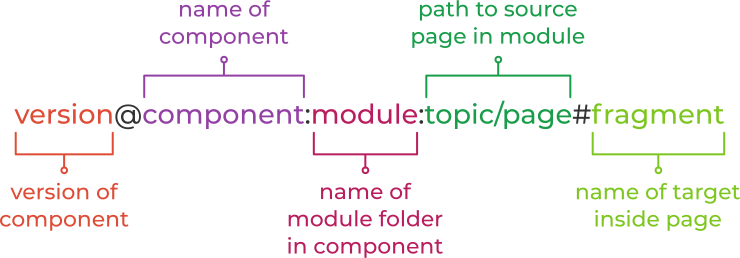
<p>Using this information, we can construct a fully-qualified page ID as follows:</p>
</div>
<div class="imageblock grow-x">
<div class="content">
<img src="https://opendevise.com/img/blog/page-id-anatomy-diagram.svg" alt="Page ID anatomy">
</div>
</div>
<div class="paragraph">
<p>Here&#8217;s an example of a fully-qualified page ID:</p>
</div>
<div class="listingblock">
<div class="content">
<pre>1.0@antora:playbook:configure.adoc#filter-branches</pre>
</div>
</div>
<div class="paragraph">
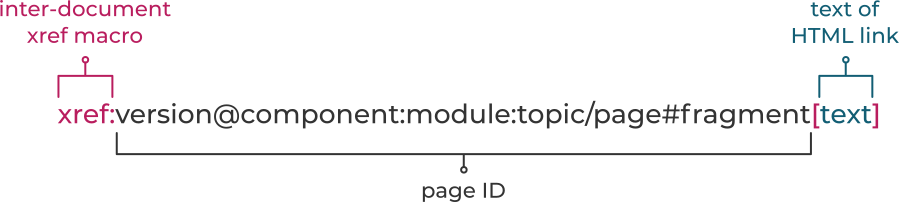
<p>We can repurpose the <a href="http://asciidoctor.org/docs/user-manual/#inter-document-cross-references" target="_blank" rel="noopener">inter-document xref macro</a> in AsciiDoc to convert this page ID into a link:</p>
</div>
<div class="imageblock grow-x">
<div class="content">
<img src="https://opendevise.com/img/blog/xref-macro-anatomy-diagram.svg" alt="Page reference anatomy">
</div>
</div>
<div class="paragraph">
<p>Here&#8217;s how that looks in practice:</p>
</div>
<div class="listingblock">
<div class="content">
<pre>xref:1.0@antora:playbook:configure.adoc#filter-branches[filter branches]</pre>
</div>
</div>
<div class="paragraph">
<p><strong>We&#8217;ve avoided coupling to the published URL</strong> by using a source-to-source reference.
(Notice the page coordinate ends with .adoc, the file extension of an AsciiDoc source file).
Regardless of whether you&#8217;re deploying your site locally, to staging, or to production, or you change URL strategies, the page ID always remains the same.
The reference locks on to the target page and produces a URL that points to it wherever it gets published.</p>
</div>
<div class="paragraph">
<p><strong>We&#8217;ve avoided coupling to the filesystem</strong> by using a location based on the documentation component structure.
The page ID describes the source file&#8217;s project (component / version) and where in that project the source file is located (module / page).</p>
</div>
<div class="paragraph">
<p><strong>We&#8217;ve eliminated the relative path (../../) problem</strong> by specifying the page as a module-relative path.
The path always starts from a module&#8217;s <em class="path">pages</em> directory, even when the referencing page is located inside a topic folder.
If you move or rename a page within a module, you don&#8217;t have to change any references to other pages.</p>
</div>
<div class="paragraph">
<p>Of course, inbound references to the page you move do have to be updated.
To counter this, you could pin the page ID of the page you want to move, thus adding more stability.
That way, references to the page don&#8217;t have to be updated even when it moves.
Though, a little help from the text editor to &#8220;refactor&#8221; references could make this abstraction unnecessary.</p>
</div>
<div class="paragraph">
<p><strong>We&#8217;ve made it possible to validate and update references</strong> by using a well-defined pattern that&#8217;s easy for a script to locate, parse, and rewrite.</p>
</div>
<div class="paragraph">
<p>This human-friendly referencing system saves you from having to do computations in your head while writing.
You just specify the coordinates of the page you want to reference.
There&#8217;s no need to worry about the source file physical location on disk or its published URL.
All you need to know are the names of your components, versions, modules, and pages so you can fill in this information.</p>
</div>
<div class="paragraph">
<p>Specifying the component and version every time seems like overkill.
Surely there must be some sort of shorthand, right?</p>
</div>
</div>
</div>
<div class="sect1">
<h2 id="_concise-contextual-references">Concise contextual references<a class="anchor" href="#_concise-contextual-references"></a></h2>
<div class="sectionbody">
<div class="paragraph">
<p>The full page ID sure seems like a lot to type each time you need to create a page reference.
It also <em>increases</em> coupling when linking between pages of the same module or component, something you&#8217;ll do often.
The problem is, the page ID often includes more information than is necessary.
What we want to do instead is trim it down to just the essential information.
We can do that by taking into account one of the most important aspects of a page ID: its context.</p>
</div>
<div class="paragraph">
<p>Let&#8217;s continue with the phone analogy.
Think about when you&#8217;re at the office.
You probably don&#8217;t need to use a complete telephone number to call someone in your office.
There&#8217;s a company directory with extension numbers for every phone.
You just punch in a short extension for the person you want to reach, and the call goes through.
You&#8217;re benefiting from the two phones sharing the same context.</p>
</div>
<div class="paragraph">
<p>It&#8217;s the same way for page IDs.
If you want to reference a page stored in the same module as the current page, which is most often the case, you only need to specify the filename of the other page.</p>
</div>
<div class="listingblock">
<div class="content">
<pre>xref:page-in-same-module.adoc[link text]</pre>
</div>
</div>
<div class="paragraph">
<p>If you want to reference a page in a different module, you only need to specify the module and filename of the other page:</p>
</div>
<div class="listingblock">
<div class="content">
<pre>xref:sibling-module:page.adoc[link text]</pre>
</div>
</div>
<div class="paragraph">
<p>To reference another version of a page in the same module, just prepend the version number to the filename.</p>
</div>
<div class="listingblock">
<div class="content">
<pre>xref:1.1@page.adoc[link text]</pre>
</div>
</div>
<div class="paragraph">
<p>You only have to use the full page ID when you need to refer to a page that belongs to another component.</p>
</div>
<div class="listingblock">
<div class="content">
<pre>xref:2.1@other-component:module:page.adoc[link text]</pre>
</div>
</div>
<div class="paragraph">
<p>The great thing about contextual references is that they are not coupled to the current component version.
That means you don&#8217;t need to update the contextual page references when creating a new version of the component.
All you&#8217;ll need to do is change the version number in the <em class="path">antora.yml</em> file after you create your new version branch.</p>
</div>
</div>
</div>
<div class="sect1">
<h2 id="_why-component-version-and-not-repository-branch">Why component/version and not repository/branch?<a class="anchor" href="#_why-component-version-and-not-repository-branch"></a></h2>
<div class="sectionbody">
<div class="paragraph">
<p>You may have noticed we&#8217;ve been using the terms component and version instead of repository and branch when discussing page references.
Why the distinction?
Aren&#8217;t they the same?</p>
</div>
<div class="paragraph">
<p>There are two reasons for these abstractions:</p>
</div>
<div class="olist arabic">
<ol class="arabic">
<li>
<p>reduced coupling</p>
</li>
<li>
<p>fungibility</p>
</li>
</ol>
</div>
<div class="paragraph">
<p>First, let&#8217;s look at how this abstraction reduces coupling.</p>
</div>
<div class="sect2">
<h3 id="_reduced-coupling">Reduced coupling<a class="anchor" href="#_reduced-coupling"></a></h3>
<div class="paragraph">
<p>Our instinct might be to assume the name of the component is the same as the name of the repository.
But that can be very limiting.</p>
</div>
<div class="paragraph">
<p>First, we&#8217;d lose the ability to change the name of the repository without consequence.
For example, we might decide to add a prefix to the name of all documentation repositories to help distinguish them from software repositories.
Once we clone a repository to work with it offline, we might not know what the repository is anymore because it&#8217;s not necessarily clear what the origin is.
And if there&#8217;s more than one documentation component in a repository, we certainly can&#8217;t count on the repository to provide the component name.
So we need a more stable way to identify the name of the component.</p>
</div>
<div class="paragraph">
<p>The same can be said for the branch.
At first, we might think that the branch could be the version number.
But that means we have little control over branch names, especially when they are mixed with other types of branches or, again, we&#8217;re working with a local copy of the branch.
We&#8217;d have to rely on the git remote to be accurate, and it may not always be.</p>
</div>
<div class="paragraph">
<p>In the end, that&#8217;s why we put this information in the component descriptor file, <em class="path">antora.yml</em>.
This file provides stable metadata that the site generator and other tools can use when they need to retrieve information about the component and version.
It&#8217;s these values that are used in the page ID&#8217;s component and version coordinates:</p>
</div>
<div class="listingblock">
<div class="content">
<pre class="highlight"><code class="language-yml" data-lang="yml">name: component-a
version: '1.0'
# ...</code></pre>
</div>
</div>
<div class="paragraph">
<p>But there&#8217;s another benefit to storing this information in the component descriptor file, fungibility.</p>
</div>
</div>
<div class="sect2">
<h3 id="_fungibility">Fungibility<a class="anchor" href="#_fungibility"></a></h3>
<div class="paragraph">
<p>A repository provides a component, and a branch provides a version.
But we could substitute a different repository to provide that component or a different branch to provide that version.
In fact, different branches of different repositories could contribute different versions of the same component.
Or a single component version could be spread across multiple repositories.</p>
</div>
<div class="paragraph">
<p>In the end, the source location doesn&#8217;t really matter.
It&#8217;s the files that the source <em>contributes</em> that matter.
This is how we can have a branch still in development (e.g., v4-beta) stand in for a final version (e.g., v4) before the final version is released.
It also allows you to have a branch in your own fork substitute the version from the official branch before you&#8217;re ready to merge your changes.
In other words, it allows us to really stretch this <a href="../content-is-sovereign/">multi-repository design</a> to cover a lot of different scenarios.</p>
</div>
</div>
</div>
</div>
<div class="sect1">
<h2 id="_extending-the-syntax">Extending the syntax<a class="anchor" href="#_extending-the-syntax"></a></h2>
<div class="sectionbody">
<div class="paragraph">
<p>Page IDs provide an intuitive and reliable way to reference pages, whether within the same module, another module in the same component, or a completely different component and version.
By extending the inter-document xref macro in Asciidoctor to support page IDs, writers can use page IDs to make links between pages.
Transcribing the page ID into a reference for frequently cited pages should quickly become habit for writers.
When they forget, the text editor can lend a helping hand.</p>
</div>
<div class="paragraph">
<p>Since page references can be used to make links to pages anywhere in the site, they&#8217;re also a perfect fit for the navigation system.
The navigation system can be designed to read AsciiDoc files composed of page references organized in a nested list.</p>
</div>
<div class="paragraph">
<p>Page IDs could also be used for page routing.
A page could claim multiple page IDs.
These page aliases would then be translated into URL routes that redirect to the master page.
Such aliases might come in handy when a page is moved or removed, or for making vanity URLs.</p>
</div>
<div class="paragraph">
<p>Page references are just one example of how the AsciiDoc syntax can be extended to simplify a common documentation task.
In the next article, we&#8217;ll look deeper into how well suited AsciiDoc is for writing and producing documentation and at additional ways we could build on the syntax to address common writing requirements.</p>
</div>
<div class="paragraph">
<p><em>Special thanks to Sarah White and Lisa Ruff for their substantial revisions to this article.
Additional thanks to Sarah White for creating the intuitive diagrams featured in this article.</em></p>
</div>
</div>
</div>]]></content><summary type="html">Technical documentation requires readers to take in a lot of complex information.
To make documentation consumable, readers need a logical flow of pages to navigate.
To help readers get from one page to the next, we need a simple and reliable system for creating references between pages.
This article proposes an intuitive and stable page referencing system for documentation.</summary><media:thumbnail xmlns:media="http://search.yahoo.com/mrss/" url="https://opendevise.com/img/blog/page-id-anatomy-diagram-feature.png" /></entry><entry><title>A Standard Project Structure for Documentation</title><link rel="alternate" href="https://opendevise.com/blog/standard-project-structure-for-docs/" type="text/html" /><published>2017-11-20T16:00:00Z</published><updated>2017-11-20T16:00:00Z</updated><id>https://opendevise.com/blog/standard-project-structure-for-docs/</id><author><name>Dan Allen</name></author><category term="Antora" /><category term="Architecting Antora" /><category term="Docs" /><content type="html"><![CDATA[<div id="preamble">
<div class="sectionbody">
<div class="paragraph">
<p>In a <a href="../content-is-sovereign/">previous article</a>, we established that <strong>content is sovereign</strong>, which means the site generator needs to gather content from various repositories and branches.
In order for the generator to identify, aggregate, and catalog content partitioned in this way, the repositories must present a consistent structure.
Otherwise, the generator isn&#8217;t going to know which files represent pages or which pages should be grouped together.</p>
</div>
<div class="imageblock grow-x">
<div class="content">
<img src="https://opendevise.com/img/blog/identify-and-catalog-components-diagram.svg" alt="Identify and catalog components">
</div>
</div>
<div class="paragraph">
<p>Writers also need consistency so they don&#8217;t have to be constantly switching between disparate systems of organization.</p>
</div>
<div class="paragraph">
<p>Let&#8217;s explore the benefits a standard structure would bring to documentation projects, both for writers and tools.
We&#8217;ll also share a structure we&#8217;ve found works well.</p>
</div>
</div>
</div>
<div class="sect1">
<h2 id="_the-benefits-of-a-standard-structure">The benefits of a standard structure<a class="anchor" href="#_the-benefits-of-a-standard-structure"></a></h2>
<div class="sectionbody">
<div class="paragraph">
<p>A standard project structure (or project layout) is a practice commonly used in software development.
In Java projects, Java code is organized under <em class="path">src/main/java</em> and <em class="path">src/test/java</em>.
Android projects build on this structure by assuming the manifest file is located in <em class="path">src/main</em> and the resource files are located under <em class="path">src/main/res</em>.
In Ruby projects, Ruby code resides in <em class="path">lib</em> and <em class="path">test</em>.
And the list goes on.</p>
</div>
<div class="paragraph">
<p>So why is a standard project beneficial?
When a software project uses a standard structure, a developer can come into the project and know right away where to find the source code, how to build it, and how to run it.
The same goes for the tools the developer uses.</p>
</div>
<div class="paragraph">
<p><em>Wouldn&#8217;t that be a great practice to apply to a documentation project?</em></p>
</div>
<div class="paragraph">
<p>Writers are looking for a writing system that does not involve a steep learning curve.
After all, their job is to write, not be detectives.
Right now, the lack of a standard structure means writers must dedicate a lot of time learning the ropes of each documentation project they join.</p>
</div>
<div class="paragraph">
<p>If a documentation project had a standard structure, writers would know where to find files, from documents to supporting assets.
Like their developer counterparts, they could immediately be productive upon onboarding.
The structure would encourage more contributions since this instant productivity would extend to community members as well.
And tools could be developed to work with this structure, further improving writers&#8217; productivity and helping them to keep the content organized.</p>
</div>
<div class="paragraph">
<p>In the words of Michael Moore: that&#8217;s a good idea, so we should steal it.</p>
</div>
</div>
</div>
<div class="sect1">
<h2 id="_a-proposed-standard">A proposed standard<a class="anchor" href="#_a-proposed-standard"></a></h2>
<div class="sectionbody">
<div class="paragraph">
<p>Here&#8217;s a documentation project structure we&#8217;ve put together based on our experience working with a myriad of documentation projects.
It includes several sample files thrown in for context.</p>
</div>
<div class="literalblock">
<div class="content">
<pre>antora.yml
modules/
  ROOT/
    assets/
      attachments/
        sample-dataset.csv
      images/
        supporting-diagram.svg
    pages/
      account-setup.adoc
      index.adoc
      install-on-fedora.adoc
      _partials/
        tool-definition.adoc
    examples/
      install-commands.sh
  admin/
    assets/
    pages/
    examples/
  api/
    assets/
    pages/
    examples/</pre>
</div>
</div>
<div class="paragraph">
<p>The structure in this listing represents a <em class="term">documentation component</em>.
You can think of a documentation component as a documentation project.</p>
</div>
<div class="paragraph">
<p>We know the structure in the example above represents a documentation component because of the presence of an <em class="path">antora.yml</em> file.</p>
</div>
<div class="literalblock">
<div class="content">
<pre>antora.yml
&lt;documentation component here&gt;</pre>
</div>
</div>
<div class="paragraph">
<p>When we find an <em class="path">antora.yml</em> file in a repository, we expect to find the standard structure of a documentation component below it.
Thus, the documentation can live anywhere in the repository.
It also means it can share the same repository as the software it documents.
This project structure is then repeated in each branch of each repository that hosts a documentation component.</p>
</div>
<div class="paragraph">
<p>The <em class="path">antora.yml</em> file contains information about the component, such as its name, title, version, and navigation data.</p>
</div>
<div class="listingblock">
<div class="content">
<pre class="highlight"><code class="language-yml" data-lang="yml">name: component-a
title: Component A
version: '1.0'
nav:
- modules/admin/nav.adoc</code></pre>
</div>
</div>
<div class="paragraph">
<p>All the other files in the component reside in the <em class="path">modules</em> folder.
Let&#8217;s open that folder and have a look inside.</p>
</div>
<div class="sect2">
<h3 id="_modules">Modules<a class="anchor" href="#_modules"></a></h3>
<div class="paragraph">
<p>A documentation component contains one or more modules.
A <em class="term">module</em> is a discrete bundle of content within a component.</p>
</div>
<div class="literalblock">
<div class="content">
<pre>admin/
  assets/
    attachments/
      signing-key.gpg
    images/
      web-console-dashboard.png
  pages/
    index.adoc
    dashboard-tour.adoc
    backup/
      index.adoc
      scheduling.adoc
    security/
      index.adoc
    _partials/
      prerequisite-checklist.adoc
  examples/
    ldap.conf</pre>
</div>
</div>
<div class="paragraph">
<p>Since documentation contains more than just text, the module itself is composed of a hierarchy of folders.
These folders are used to organize files, first by content type, then by topic (or perhaps tag or category).</p>
</div>
<div class="paragraph">
<p>Text documents that represent pages go in the <em class="path">pages</em> folder.
Images go in the <em class="path">assets/images</em> folder.
Examples (often code snippets) go in the <em class="path">examples</em> folder.
Other content types are organized in a similar fashion.
Each one of these folders can have an arbitrary depth of topic folders that are used to group files to make them easier to manage and navigate.</p>
</div>
<div class="paragraph">
<p>When a writer is working on the content, the module becomes the writer&#8217;s primary workspace.
The writer doesn&#8217;t have to go looking elsewhere to find files that belong together.
This arrangement mirrors how software developers work on source code.</p>
</div>
</div>
<div class="sect2">
<h3 id="_why-modules">Why modules?<a class="anchor" href="#_why-modules"></a></h3>
<div class="paragraph">
<p>You might be contemplating one or more of the following questions:</p>
</div>
<div class="paragraph">
<p><em>Do we need all this structure?<br>
Why have modules?<br>
Isn&#8217;t a component enough?</em></p>
</div>
<div class="paragraph">
<p>One thing we know for sure about content is that it multiplies, often fast and unpredictably.
As more content is created, you&#8217;ll need this extra layer of organization to keep disparate files from ending up on top of one another.</p>
</div>
<div class="paragraph">
<p>You could argue certain components don&#8217;t need this much structure.
In the case of a component that only has single module, we <em>could</em> abbreviate the structure by folding the contents of the module folder directly into the component folder (i.e., the top-level folder).
But what happens when the project expands in complexity, and you find yourself needing to add another module?
You now have to go back and change the structure of the project in order to allocate space for it.
That&#8217;s where the ROOT module comes in.</p>
</div>
<div class="literalblock">
<div class="content">
<pre>antora.yml
modules/
  ROOT/
    assets/
    pages/
    examples/
  ...</pre>
</div>
</div>
<div class="paragraph">
<p>The first module in the structure shown in the listing above is named <em>ROOT</em>.
Notice it&#8217;s in all uppercase.
That&#8217;s because it&#8217;s special.
The ROOT module contains all the content that&#8217;s directly associated with the component itself.
When the content in the ROOT module is published, it gets promoted a level above the other modules, at the component root, hence the name.
In contrast, the content of other modules reside in subfolders.</p>
</div>
<div class="literalblock">
<div class="content">
<pre>https://docs.project-name.com/
  component-a/
    index.html
    admin/
      index.html
    api/
      index.html</pre>
</div>
</div>
<div class="paragraph">
<p>If you start out with a ROOT module, even for a simple component, you can easily add more modules later and gradually redistribute the content without having to restructure the project.
So while the extra structure seems like overkill now, in the long run, you&#8217;ll be glad you gave your content the space to grow.</p>
</div>
</div>
</div>
</div>
<div class="sect1">
<h2 id="_strong-tooling">Strong tooling<a class="anchor" href="#_strong-tooling"></a></h2>
<div class="sectionbody">
<div class="paragraph">
<p>A compelling benefit of a standard structure is interoperability with tools.
Software platforms which have established a standard project structure enjoy strong tooling.
This is no accident.</p>
</div>
<div class="paragraph">
<p>Here are some examples of tools that could be created if we had a standard documentation structure:</p>
</div>
<div class="dlist">
<dl>
<dt class="hdlist1">wizards</dt>
<dd>
<p>Tools could provide wizards that set up a standard project structure based on a handful of user-defined values.
Those wizards could also add, remove, or reorganize files, and know precisely where those files belong and how to handle references to them.</p>
</dd>
<dt class="hdlist1">validation</dt>
<dd>
<p>Validation tools could be created to enforce this structure and warn you when you put a file in the wrong place.</p>
</dd>
<dt class="hdlist1">migration</dt>
<dd>
<p>Migration tools could be made to pass content between components or modules, or move a module from one component to another.
The migration tool could even handle moving content into this standard structure.</p>
</dd>
<dt class="hdlist1">text editor / IDE</dt>
<dd>
<p>A text editor or IDE could recognize this structure and inject additional context into the AsciiDoc documents (such as defining document attributes) so the documents can be previewed with full fidelity inside the editor, despite being viewed outside of the context of the site generator.</p>
</dd>
</dl>
</div>
<div class="paragraph">
<p>The more that tools can assume about how the content is organized, the more those tools can help you.
If a standard project structure for documentation is adopted, tooling efforts around documentation would surely emerge.</p>
</div>
</div>
</div>
<div class="sect1">
<h2 id="_standard-means-referenceable">Standard means referenceable<a class="anchor" href="#_standard-means-referenceable"></a></h2>
<div class="sectionbody">
<div class="paragraph">
<p>Another benefit of a standard structure hailing from the software world is that it provides a system for making references.</p>
</div>
<div class="paragraph">
<p>Several site generators support sections, otherwise known as collections, for partitioning the content.
Although these mechanisms fill a role similar to modules, they have the drawback of cutting off references between pages.
What we need is a contract with the site generator to track a reference to another source file all the way through to publishing.
Wherever that other file ends up, you want the site generator to construct the correct link to it.
And it should be possible to make a reference not only to a file in another module, but one in another version or even another component.
The foundation of such a reference system is a standard, addressable structure.</p>
</div>
<div class="paragraph">
<p>By using a standard structure that consists of components and modules, files are in a reliable and, more important, referenceable location.
That means we can use that structure with AsciiDoc and create input source to input source references that span modules or components.
We&#8217;ll talk in depth about <a href="../referencing-pages/">expanding AsciiDoc&#8217;s xref capabilities in a later article</a> in this series.</p>
</div>
</div>
</div>
<div class="sect1">
<h2 id="_tying-up-loose-content">Tying up loose content<a class="anchor" href="#_tying-up-loose-content"></a></h2>
<div class="sectionbody">
<div class="paragraph">
<p>A standard project structure would bring many of the same benefits to documentation as it has to software.</p>
</div>
<div class="paragraph">
<p>No longer would there be confusion about where to find or append documentation files.
Instead, writers would recognize the familiar structure and immediately be able to get down to work.</p>
</div>
<div class="paragraph">
<p>By offering a logical place for different types of files, the self-describing structure would help writers navigate the hierarchy and keep files organized.
Tools can then be developed to work with this structure to streamline daily tasks and automated processes.
Among these tools is the multi-repository, CD-friendly site generator we&#8217;re introducing in <a href="../tag/architecting-antora/">this series</a>, which would be able to discover documentation components and know how to classify the files contained within them.</p>
</div>
<div class="paragraph">
<p>Whether we&#8217;re talking about the writers or the tools, all parties benefit from being able to rely on a standard project structure.
Now <em>that&#8217;s</em> an idea worth stealing.</p>
</div>
<div class="paragraph">
<p><em>Special thanks to Sarah White and Lisa Ruff for their substantial revisions to this article.
Additional thanks to Sarah White for creating the diagram featured in this article.</em></p>
</div>
</div>
</div>]]></content><summary type="html">If you browse the source code of software projects, you&#8217;ll notice that projects built for the same platform share a common structure.
This practice makes projects immediately recognizable.
It also matches the assumptions of tools that build them.
No such structure exists for documentation.
To reduce friction when writing, and to make way for a stronger ecosystem of tools, this article proposes a standard directory structure for documentation projects.</summary><media:thumbnail xmlns:media="http://search.yahoo.com/mrss/" url="https://opendevise.com/img/blog/measuring-spoons-feature.jpg" /></entry><entry><title>Content is Sovereign</title><link rel="alternate" href="https://opendevise.com/blog/content-is-sovereign/" type="text/html" /><published>2017-11-16T16:00:00Z</published><updated>2017-11-16T16:00:00Z</updated><id>https://opendevise.com/blog/content-is-sovereign/</id><author><name>Dan Allen</name></author><category term="Antora" /><category term="Architecting Antora" /><category term="Docs" /><content type="html"><![CDATA[<div id="preamble">
<div class="sectionbody">
<div class="paragraph">
<p>Static site generators are popular tools for producing documentation sites.
They consume content written in a lightweight markup language such as AsciiDoc, convert the content to HTML pages, and publish the output to a web server.
Simple enough.</p>
</div>
<div class="paragraph">
<p>But there&#8217;s a crucial step missing in this process.
Where does the site generator get the content to convert?
And does it respect the sovereignty of that content, or is it fostering a content monolith?</p>
</div>
<div class="paragraph">
<p>That all leads us to ask the following question&#8230;&#8203;</p>
</div>
</div>
</div>
<div class="sect1">
<h2 id="_where-does-content-live">Where does content live?<a class="anchor" href="#_where-does-content-live"></a></h2>
<div class="sectionbody">
<div class="paragraph">
<p>Most static site generators insist on centralizing the site&#8217;s source content.
The generator reads local files that originate from the current branch of the site repository, then use that content to make a site.</p>
</div>
<div class="paragraph">
<p>That means everyone in an organization&#8212;&#8203;writers, engineers, marketing, community contributors&#8212;&#8203;must write into the same branch of the same repository.
The result is lots of content kings but zero sovereignty.
Who owns the content?
Who resolves conflicts?
Who decides when to release?
What we&#8217;ve observed is that contributors just end up stepping on each other&#8217;s toes and everyone&#8217;s left frustrated.</p>
</div>
<div class="paragraph">
<p><em>One branch, one repository.</em>
Sometimes even a single folder.
That&#8217;s the first major obstacle we encounter when using a typical static site generator.</p>
</div>
<div class="paragraph">
<p>One workaround is to make a copy of the disparate content and import it all into the sole branch of the site repository.
But not only does that spawn a content monolith, it also makes the content divergent!
And it grows hairier with every new product and product version that engineering releases.</p>
</div>
<div class="paragraph">
<p><strong>If we weren&#8217;t hamstrung by a generator&#8217;s one branch, one repository rule, where would we store our documentation?</strong></p>
</div>
<div class="paragraph">
<p>We could store it alongside the source code it describes.
We could store the documentation for distinct software components in their own individual repositories.
Perhaps we&#8217;d do both!</p>
</div>
<div class="imageblock grow-x">
<div class="content">
<img src="https://opendevise.com/img/blog/locate-sources-diagram.svg" alt="Multiple documentation sources">
</div>
</div>
<div class="paragraph">
<p>We don&#8217;t want to hesitate to store the documentation in as few or as many repositories as needed so the most applicable workflow, policies, file organization, versioning scheme, and team permissions can be applied to each unique <em class="term">documentation component</em>.
What we&#8217;re talking about here is modular documentation.</p>
</div>
<div class="paragraph">
<p>So, if our documentation components could be set free from a site generator&#8217;s one branch, one repository mandate, how would all of the documentation components get incorporated into a single, unified site?</p>
</div>
</div>
</div>
<div class="sect1">
<h2 id="_what-gathers-the-content">What gathers the content?<a class="anchor" href="#_what-gathers-the-content"></a></h2>
<div class="sectionbody">
<div class="paragraph">
<p>We&#8217;ve rebelled against the one branch, one repository rule and restored the sovereignty of our documentation components.
But we still need to create a documentation site from our sovereign components.
Who, or what, is responsible for gathering the content from these components?</p>
</div>
<div class="paragraph">
<p>To adapt a typical static site generator to this paradigm, we might add a shell script that clones a bunch of repositories and dumps the content into a source directory to feed the generator.
Or, perhaps, we could use an extension for the site generator that hooks into its lifecycle and pulls down content at build time.
Maybe we jerry-rig a few scripts, a custom build, and a dash of manual copy-paste together to grab the right content, at the right time, in the right order, and convince the generator to incorporate that content into the site.
Maybe.</p>
</div>
<div class="paragraph">
<p>Or, we could rethink this whole process.</p>
</div>
<div class="paragraph">
<p>Let&#8217;s head back to the whiteboard and conduct a thought experiment.
What do we want a static site generator for documentation to do?
What scenarios do we want it to handle?</p>
</div>
<div class="dlist">
<dl>
<dt class="hdlist1">The site generator doesn&#8217;t own any content. </dt>
<dd>
<p>The site repository doesn&#8217;t contain any documentation content files.
In this new workflow, the generator accepts an inventory of names and addresses of documentation components.</p>
</dd>
<dt class="hdlist1">The site generator knows how to fetch documentation components. </dt>
<dd>
<p>Using the inventory, the generator goes out, finds the documentation components, and fetches all of these bundles of content, which consist of text, images, samples, and other supporting materials.</p>
</dd>
</dl>
</div>
<div class="paragraph">
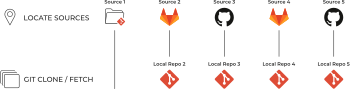
<p>The start of this process might look something like this:</p>
</div>
<div class="imageblock grow-x">
<div class="content">
<img src="https://opendevise.com/img/blog/git-clone-diagram.svg" alt="Cloning multiple documentation sources">
</div>
</div>
<div class="paragraph">
<p>This process could have potential.
But before we go any further, let&#8217;s address another major obstacle: versions.</p>
</div>
</div>
</div>
<div class="sect1">
<h2 id="_what-about-versions">What about versions?<a class="anchor" href="#_what-about-versions"></a></h2>
<div class="sectionbody">
<div class="paragraph">
<p>When we think about software, what immediately comes to mind?</p>
</div>
<div class="paragraph">
<p><em>Versions</em>.</p>
</div>
<div class="paragraph">
<p>Since software is versioned, so must the content that documents it.</p>
</div>
<div class="paragraph">
<p>If we don&#8217;t align the content with the software version it&#8217;s documenting, clarity is lost and confusion fills the void.
The user won&#8217;t know which version of the software the documentation they&#8217;re reading is for.
The writer could inadvertently drop critical information about older software versions when updating the documentation for the latest release.</p>
</div>
<div class="paragraph">
<p>But versioning documentation raises more questions.
Where should these versions live?
How do we keep documentation for different software versions separate?
Do we append a version number to the filename?
Or do we put the files inside version folders?</p>
</div>
<div class="paragraph">
<p>Let&#8217;s think about how versions are handled in software.
In software, we use branches and tags to specify and manage versions.
Employing the practice of docs as code, we would then use branches to manage versions of the software documentation as well.</p>
</div>
<div class="imageblock grow-x">
<div class="content">
<img src="https://opendevise.com/img/blog/identify-branches-diagram.svg" alt="Identify documentation branches">
</div>
</div>
<div class="paragraph">
<p>We could even store the documentation files <em>in</em> the code branches, thus truly embracing the docs as code philosophy.</p>
</div>
<div class="paragraph">
<p>Think about if we didn&#8217;t use branches to specify versions, but instead used folders labeled with version numbers in a single branch.
We&#8217;d have to duplicate all of the documentation for a software component every time there was a new version.
And we&#8217;d have no easy way to compare, manage, and merge different instances of a document.
So branches are clearly the way to go.</p>
</div>
<div class="paragraph">
<p>Let&#8217;s continue the thought experiment and update our new site generator&#8217;s workflow now that we&#8217;ve considered documentation versions.</p>
</div>
<div class="dlist">
<dl>
<dt class="hdlist1">The site generator knows how to fetch documentation components and their branches. </dt>
<dd>
<p>Using the inventory, the generator goes out, finds the documentation components, <strong>and</strong> finds the branches of each documentation component.
The generator then fetches all the materials from all the branches.</p>
</dd>
</dl>
</div>
<div class="paragraph">
<p>Fetching all the branches of a repository could be problematic.
It&#8217;s doubtful we want the generator to use every branch, or to publish the content from every documentation branch to the production site.
Some branches may even contain unedited drafts or content for unreleased software.
On the other hand, writers and engineers working on a beta release probably want to see how their new documentation is looking.</p>
</div>
<div class="paragraph">
<p>In order to reconcile this conflict, and to avoid having to generate the whole documentation site just to preview one component, we want to be able to select different branches for different circumstances.</p>
</div>
<div class="imageblock grow-x">
<div class="content">
<img src="https://opendevise.com/img/blog/identify-matching-branches-diagram.svg" alt="Identify matching documentation branches">
</div>
</div>
<div class="paragraph">
<p>But how does the site generator know what content to find and how much of that content to fetch?</p>
</div>
</div>
</div>
<div class="sect1">
<h2 id="_how-much-should-we-take">How much should we take?<a class="anchor" href="#_how-much-should-we-take"></a></h2>
<div class="sectionbody">
<div class="paragraph">
<p>We don&#8217;t always want to generate everything, every time.
If we&#8217;re able to gather content from sovereign documentation repositories, each with a set of version branches, we need to decide how much content we&#8217;re going to take.</p>
</div>
<div class="paragraph">
<p>At the most basic level, we need to tell the generator what documentation components we want, what branches we want, and where they&#8217;re located.
We need a way to communicate instructions to the generator.
And if we can communicate these instructions without having three to five years of scripting experience, that&#8217;s even better.</p>
</div>
<div class="paragraph">
<p>Taking another page from software development, this time the configuration as code practice, we&#8217;ll call this set of instructions a <em class="term">playbook</em>.</p>
</div>
<div class="imageblock grow-x">
<div class="content">
<img src="https://opendevise.com/img/blog/run-antora-playbook-diagram.svg" alt="Antora playbook diagram">
</div>
</div>
<div class="paragraph">
<p>Here&#8217;s a fragment of a playbook that defines the content sources for a documentation site:</p>
</div>
<div class="listingblock">
<div class="content">
<pre class="highlight"><code class="language-yml" data-lang="yml">content:
  sources:
  - url: https://github.com/example-org/solution-docs.git
  - url: /home/writer/projects/server-docs
    branches: v3.1, v3.0, v2.5
  - url: git@github.com:example-org/rest-client-docs.git
    branches: v2*</code></pre>
</div>
</div>
<div class="paragraph">
<p>Now that we&#8217;ve figured out how the site generator knows which documentation components and branches to fetch, let&#8217;s update our thought experiment.</p>
</div>
<div class="dlist">
<dl>
<dt class="hdlist1">The site generator reads and follows the instructions in a playbook. </dt>
<dd>
<p>In this new workflow, the generator receives and reads a playbook.
The playbook is a configuration file that contains an inventory of names, addresses, and <em>branches</em> of documentation components.</p>
</dd>
</dl>
</div>
<div class="paragraph">
<p>A site generator designed to take instructions this way could be very versatile.
Depending on the documentation site we need to generate, we could select or exclude specific versions of a documentation component.</p>
</div>
<div class="paragraph">
<p>For example, we might want to include beta documentation in an early release site:</p>
</div>
<div class="listingblock">
<div class="content">
<pre class="highlight"><code class="language-yml" data-lang="yml">content:
  sources:
  - url: /home/writer/projects/server-docs
    branches: v4.0-beta, v3.1, v3.0, v2.5</code></pre>
</div>
</div>
<div class="paragraph">
<p>And, as the example above shows, the generator could also incorporate local content we&#8217;re working on so we can generate a site locally and preview our work.</p>
</div>
<div class="paragraph">
<p>Or, we might want to take the latest version of one documentation component and make a microsite for one software product while still including that content in our main documentation site.</p>
</div>
<div class="paragraph">
<p>Having the ability to tell a site generator what content it should use gives developers and non-developers alike tremendous control over documentation sites.
Now we can create a wide variety of sites from the same content.
That&#8217;s content reuse at its finest.
That&#8217;s also something that&#8217;s difficult (if not impossible) to do when all the content lives in the same branch of the same repository.</p>
</div>
</div>
</div>
<div class="sect1">
<h2 id="_take-back-your-content">Take back your content!<a class="anchor" href="#_take-back-your-content"></a></h2>
<div class="sectionbody">
<div class="paragraph">
<p>Let&#8217;s review the new capabilities and process we&#8217;ve specced out for our improved documentation site generator so far.</p>
</div>
<div class="dlist">
<dl>
<dt class="hdlist1">The site generator doesn&#8217;t own any content. </dt>
<dd>
<p>The site repository doesn&#8217;t contain any content files.
The content for the site is stored in one or as many sovereign documentation components as our organization needs.</p>
</dd>
<dt class="hdlist1">The site generator knows how to read and follow the instructions in a playbook. </dt>
<dd>
<p>The generator receives and reads a playbook.
The playbook is a configuration file that contains an inventory of names, addresses, and branches of documentation components.</p>
</dd>
<dt class="hdlist1">The site generator knows how to fetch documentation components and their branches. </dt>
<dd>
<p>Following the playbook configuration, the generator goes out, finds the specified documentation components, and finds the specified branches of each documentation component.
The generator fetches all of the content&#8212;&#8203;text, images, samples, and other supporting materials&#8212;&#8203;from each selected branch and puts this content into a catalog.
Only then does it advance to the processing step.</p>
</dd>
</dl>
</div>
<div class="paragraph">
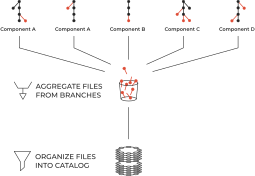
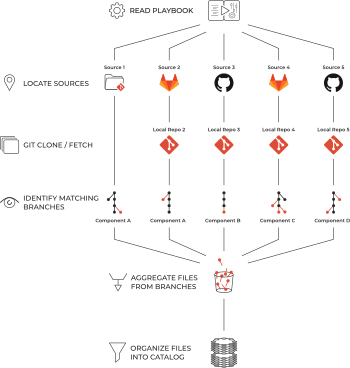
<p>Here&#8217;s the whole process starting with the playbook and ending with the content organized in a catalog:</p>
</div>
<div class="imageblock grow-x">
<div class="content">
<img src="https://opendevise.com/img/blog/sort-files-into-catalog-diagram.svg" alt="Organize files into catalog diagram">
</div>
</div>
<div class="paragraph">
<p>We believe this process fits with the way documentation is managed in the real world.</p>
</div>
<div class="paragraph">
<p>Documentation is written and stored in different places, is organized in different ways, and is owned and managed by different teams.
<strong>Documentation isn&#8217;t centralized, it&#8217;s distributed!</strong></p>
</div>
<div class="paragraph">
<p>With a site generator that can find and fetch content, content can reside in multiple repositories and organizations, in different hosts, and have different permissions and visibility.
Teams can manage their own content, in their own way, keeping it current and under version control.
Content could even come from local directories not under version control, including the worktree of a cloned repository.</p>
</div>
</div>
</div>
<div class="sect1">
<h2 id="_next-challenges">Next challenges<a class="anchor" href="#_next-challenges"></a></h2>
<div class="sectionbody">
<div class="paragraph">
<p>We&#8217;re not done yet.
If we&#8217;re going to challenge and improve the typical documentation site generation capabilities and workflows, we&#8217;ve only scratched the surface.</p>
</div>
<div class="paragraph">
<p>Here&#8217;s a few of the other obstacles we&#8217;ll tackle in <a href="../tag/architecting-antora/">this series</a> of articles:</p>
</div>
<div class="ulist">
<ul>
<li>
<p>Code repositories typically adhere to a standard structure in order to facilitate contributions and CI/CD.
What would a <a href="../standard-project-structure-for-docs/">content repository&#8217;s structure look like</a>?</p>
</li>
<li>
<p>If our content lives in multiple repositories and multiple branches, how do we <a href="../referencing-pages/">create page references between documentation components</a>?
And while we&#8217;re at it, let&#8217;s make sure that when we create a new version we don&#8217;t have to update any page references.</p>
</li>
<li>
<p>If we decouple the content from the site generator, why not the UI too?</p>
</li>
<li>
<p>With the ability to read a playbook and fetch files from repositories and filesystems, the site generator has expanded beyond the scope of a generator.
Such a monolithic piece of software won&#8217;t be able to respond to the changing information architecture, web technology, and infrastructure integrations our users and organizations need.
Don&#8217;t worry, in our quest to eliminate content monoliths, we&#8217;ll embrace modularity in the software as well.</p>
</li>
</ul>
</div>
<div class="paragraph">
<p><em>Special thanks to Sarah White and Lisa Ruff for their substantial revisions to this article.
Additional thanks to Sarah White for creating the spectacular diagrams featured in this article.</em></p>
</div>
</div>
</div>]]></content><summary type="html">Content is king.
That we know.
But we forget that content is also sovereign.
Too often, that independence gets trampled when producing a documentation site, giving rise to a content monolith.
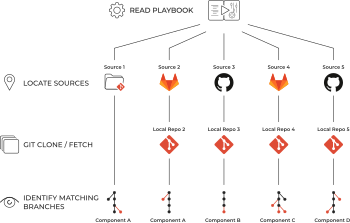
In this article, we present a new way of organizing content for a documentation site that respects and utilizes the content&#8217;s sovereignty.</summary><media:thumbnail xmlns:media="http://search.yahoo.com/mrss/" url="https://opendevise.com/img/blog/fetch-content-diagram-feature.png" /></entry><entry><title>Documentation Ideas Coming Your Way!</title><link rel="alternate" href="https://opendevise.com/blog/hello/" type="text/html" /><published>2017-11-16T15:45:00Z</published><updated>2017-11-16T15:45:00Z</updated><id>https://opendevise.com/blog/hello/</id><author><name>OpenDevise</name></author><category term="News" /><content type="html"><![CDATA[<div class="paragraph">
<p>Hello, documentation world!
Welcome to the Docs Dispatch, our blog about all things documentation.</p>
</div>
<div class="paragraph">
<p>We&#8217;ve revved up the blog so we can share our documentation ideas, insights, and experiences with you.
We&#8217;ll cover it all, from writing to team workflows all the way through to continuous delivery, whether it&#8217;s for one product or a score of them.
You&#8217;ll also learn about Open Source tools we&#8217;re working on to help make this all possible.</p>
</div>
<div class="paragraph">
<p>First, a little bit about who we are.
We&#8217;re an experienced team of writers, system architects, and developers.
We put that experience to work to improve the state of documentation.
But not just any documentation.
Documentation written in the lightweight markup language AsciiDoc and processed with our favorite tool, <a href="http://asciidoctor.org">Asciidoctor</a>.</p>
</div>
<div class="paragraph">
<p>Although we&#8217;re a small company, we have a big goal.
We want writers to love writing documentation and be productive creating it.
We want readers to love reading documentation and learn effectively from it.
And, above all, we want to give documentation managers the creative space to launch new content intiatives.</p>
</div>
<div class="quoteblock">
<blockquote>
<div class="paragraph">
<p>We help organizations produce documentation that their users adore.</p>
</div>
</blockquote>
</div>
<div class="paragraph">
<p>We&#8217;re kicking off this blog with a series of articles about <a href="https://gitlab.com/antora">Antora</a>, a new documentation tool we&#8217;re cooking up.
We&#8217;ll lay out the thought process that led us to creating Antora and why we feel strongly that there&#8217;s a need for it.
In brief, while there are countless site generators out there, few are well-suited for documentation, and none are made exclusively for AsciiDoc.
Antora is designed exactly for that use case.</p>
</div>
<div class="paragraph">
<p>We believe Antora is going to have a big impact on documentation and become an integral part of the Asciidoctor ecosystem.
We even plan to use it for the Asciidoctor documentation.
You&#8217;ll learn a lot more about Antora in the articles to come.</p>
</div>
<div class="paragraph">
<p>Thanks for stopping by!
We hope you&#8217;ll enjoy our musings about all things documentation.</p>
</div>]]></content><summary type="html">Welcome to the OpenDevise blog. We&#8217;ll use this space to share our documentation ideas, insights, and experiences as well as news about our company and products.</summary><media:thumbnail xmlns:media="http://search.yahoo.com/mrss/" url="https://opendevise.com/img/blog/opendevise-ideas-feature.png" /></entry></feed>